- English
- French
- German
- Portuguese
- Spanish
- Russian
- Japanese
- Korean
- Arabic
- Greek
- German
- Turkish
- Italian
- Danish
- Romanian
- Indonesian
- Czech
- Afrikaans
- Swedish
- Polish
- Basque
- Catalan
- Esperanto
- Hindi
- Lao
- Albanian
- Amharic
- Armenian
- Azerbaijani
- Belarusian
- Bengali
- Bosnian
- Bulgarian
- Cebuano
- Chichewa
- Corsican
- Croatian
- Dutch
- Estonian
- Filipino
- Finnish
- Frisian
- Galician
- Georgian
- Gujarati
- Haitian
- Hausa
- Hawaiian
- Hebrew
- Hmong
- Hungarian
- Icelandic
- Igbo
- Javanese
- Kannada
- Kazakh
- Khmer
- Kurdish
- Kyrgyz
- Latin
- Latvian
- Lithuanian
- Luxembou..
- Macedonian
- Malagasy
- Malay
- Malayalam
- Maltese
- Maori
- Marathi
- Mongolian
- Burmese
- Nepali
- Norwegian
- Pashto
- Persian
- Punjabi
- Serbian
- Sesotho
- Sinhala
- Slovak
- Slovenian
- Somali
- Samoan
- Scots Gaelic
- Shona
- Sindhi
- Sundanese
- Swahili
- Tajik
- Tamil
- Telugu
- Thai
- Ukrainian
- Urdu
- Uzbek
- Vietnamese
- Welsh
- Xhosa
- Yiddish
- Yoruba
- Zulu
How Do You Install a Serial Port Conversion Card in a PC?
To put in a Serial port conversion card in a PC, you have to turn off the computer, open the case, find a free PCI or PCIe slot, carefully place the card until it fits snugly, and then secure it with a mounting screw. Once everything is put back together, the system starts up, and drivers are put in so that it can talk to RS-232, RS-422, or RS-485 devices. For industrial automation, test tools, and measurement systems that need strong serial connections, this process brings back legacy connectivity.
Understanding Serial Port Conversion Cards
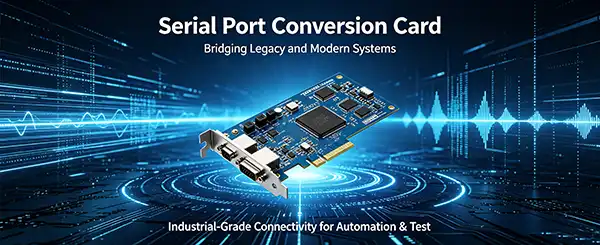
Modern computers and old industrial machines that use serial communication methods can communicate with one another thanks to Serial port conversion cards. Through RS-232, RS-422, and RS-485 standards, these adapter cards let PCs talk to older tools, programmable logic controllers, and automatic test equipment. In places where equipment is bought over many years, like industrial robotics, rocket testing, semiconductor manufacturing, and research, they are still essential.
Types of Serial Interface Adapters
There are different types of serial port devices on the market that can be used for different tasks. PCI-based cards can be used in regular desktop expansion spaces and connect workstation-class computers reliably. Different types of PCIe offer more speed and work with newer motherboard designs, which makes them good for measurement tasks that need to be very accurate. USB-to-serial converters are portable and can be hot-swapped, but in noisy industrial settings, they might not work as consistently as internal cards. Multi-port cards combine several serial channels into a single expansion slot. This makes the device smaller while still allowing for complicated test setups.
Protocol Support and Data Transfer Specifications
Knowing the differences between protocols helps buying teams choose the right gear. RS-232 connections allow point-to-point contact over short distances, usually up to 50 feet, and can handle data rates of up to 1 Mb/s in modern systems. This is shown by the PCI50101 quad-port isolated RS-232 adapter, which has a DB-37 female plug and 128-byte FIFO delay. The RS-422 and RS-485 protocols make transmission longer range and allow multiple drop setups, which are very important for distributed control systems. MXTD's PXI50101 RS-422/RS-485 adapter, for example, can send data at 3 Mb/s thanks to DMA transfers that keep CPU overhead to a minimum while constant data capture is going on.
Isolation and Environmental Protection
Electrical isolation is a very important trait for industry settings. MXTD's isolated serial adapter cards come with galvanic isolation up to 2000V as standard. This keeps sensitive computer equipment safe from voltage spikes, ground loops, and electromagnetic interference that are common in industry settings. When connecting test systems to high-power devices or working in places with unstable electrical infrastructure, this amount of safety is a must. The isolation barrier stops fault currents from moving from one piece of equipment to another. This protects the accuracy of measurements and the stability of the system.
Preparing for Installation: Key Considerations
Preparing properly avoids problems during installation and ensures that hardware parts work with each other. Technical teams should check the specs before buying something to make sure there aren't any problems with compatibility that cause projects to run late.
Hardware and Operating System Compatibility
Checking for compatibility of the serial port conversion card starts with making sure there are slots available on the processor. PCI slots are becoming less popular in new systems, but they are still common in older industrial PCs and embedded controls. PCIe slots are now common, and the hardware setups x1, x4, and x16 offer different bandwidths. Most serial adapter cards work in PCIe x1 slots, which have enough bandwidth for serial transmission needs. It's also important to pay attention to the operating system support. Windows setups usually have a lot of drivers available, but Linux applications may need kernel module configuration. The PCI50101 and PXI50101 lines from MXTD work with both Windows API and VISA driver frameworks, which makes it easier to integrate them into measurement settings that work with National Instruments.
Tool Assembly and ESD Precautions
Basic tools are needed for installation, such as a Phillips screwdriver to remove frame plates and secure mounting brackets. Anti-static methods keep parts from getting damaged while they are being handled. Wrist bands and anti-static mats are good investments because electrostatic discharge can hurt chip performance even if no damage is seen. Static electricity is less likely to build up when you work on a surface that isn't carpeting and touch grounded metal before handling cards. System integrators who are in charge of multiple setups usually set up separate workstations with the right wiring for grounding.
Data Backup and System Preparation
Making backups of your system saves you from problems that you didn't expect when you change gears. Installing expansion cards rarely changes current data, but sometimes changes to the setup or driver conflicts mean that the system needs to be restored. Months of development work are saved when important measurement software settings, calibration data, and test routines are backed up. Making a record of the current system setup, such as the COM port assignments and device manager settings, makes it easier to figure out what's wrong if startup problems happen.
Step-by-Step Installation Process
Methodically installing things lowers the risks and makes sure that the cards are seated correctly. The steps below can be used for both PCI and PCIe serial adapter cards in desktop and industrial PCs.
Powering Down and Opening the Chassis
Before working on the hardware inside the system, it must be completely shut down. When you shut down through the operating system, the file system is properly closed, and data is not lost. Once the system is turned off, unplug the power cord completely. Modern systems keep standby power even when they are turned off. Before opening the frame, wait at least 30 seconds for any remaining charge to be gone. As directed by the maker, take off the side panels by loosening the thumbscrews or removing the retention clips. Some industrial systems use security screws that need special bits to work.
Slot Selection and Card Insertion
Find an extension slot that works with the type of port on the Serial port conversion card. PCI slots have a 32-bit link that is straight out from the motherboard, while PCIe x1 slots are shorter and have a different keying setup. Unscrew the retention clamp for the matching slot cover to take it off. Make sure the fixing bracket lines up with the hole in the frame and that the Serial port conversion card's edge connector lines up with the slot. Firmly press down on the Serial port conversion card so that it fits all the way in. The connection should disappear into the slot so that you can't see any gold contacts. Incomplete insertion leads to failed recognition and sporadic connections.
Securing the Card and Cable Connections
Put the fixing plate in place while taking the screw out of the slot cover. This mechanical anchoring stops the card from moving because of vibration or wire strain. This is especially important in industrial settings where machines can cause problems. Four serial ports are combined into one interface in the PXI50101 and PCI50101 lines, which use DB-37 female connections. Connect the correct breakout wire for your protocol needs; for example, there are different cables for RS-232 and RS-422/RS-485 configurations. Make sure the connecting screws are fully engaged to keep the signal strong and stop the connection from coming loose by chance.
Driver Installation and System Verification
Modern operating systems usually find new hardware immediately when the system is turned on. Windows has tools that help you install devices, but Linux systems may need you to load modules by hand. You should get approved drivers from the manufacturer's help site instead of using generic Windows drivers, which might not have advanced features like support for non-standard baud rates. MXTD has both standard Windows API drivers and VISA-compliant interfaces, which make it easy to connect to measurement apps like LabVIEW, MATLAB, and others. Check that the card was installed correctly by going to Device Manager. It should show up under "Ports (COM & LPT)" with COM port numbers given. Before connecting important tools, make sure that the transmission works by testing it with terminal software like PuTTY or Tera Term.
Troubleshooting Common Installation Issues
Even when installation is done carefully, technical problems can still happen. Systematic debugging can fix most problems without needing help from the maker.
Device Not Detected
If the system doesn't recognize newly added Serial port conversion card hardware, make sure it was loaded correctly the first time. Turn off the computer all the way and make sure the card is firmly in place with no space between the bracket and the frame. Check the hole for junk or broken pins that could get in the way of good contact. Some motherboards block empty PCIe slots in the BIOS settings to make the best use of resources. If you go into the BIOS setup and enable all slots, detection problems may be fixed. PCI slot clashes can happen when old devices are using resources that aren't compatible with new ones. Usually, updating the BIOS software fixes these kinds of problems.
Driver Conflicts and Installation Failures
When there are driver problems, they show up as yellow exclamation points in Device Manager or as trouble messages during installation. Before installing a new Serial port conversion card, especially when changing adapters, make sure that any old serial port drivers are removed. Select "Delete the driver software for this device" from the "Uninstall device" menu in Device Manager to get rid of any leftover settings. Windows may store old driver files in its cache. The Driver Store Explorer tool can help you remove installs that will not go away. Some measurement programs install their own virtual COM port drivers that may conflict with a real Serial port conversion card. To avoid interference, it is recommended to briefly disable this software while setting up the hardware.
Communication Errors and Port Configuration
Even if the hardware was put correctly, connection problems may still happen. Make sure that the settings for the port meet the needs of the linked equipment. The baud rate, data bits, parity bits, and stop bits must all be perfectly aligned. MXTD's adapter cards can work with special tools that need to communicate at speeds that aren't standard because they support non-standard baud rates. When setting up an RS-422 or RS-485 device, you need to pay attention to the signal direction and termination resistors. Signal echoes from bad termination can mess up data, especially on longer cable runs. Checking the quality of the data with an oscilloscope can help find electrical problems that software tools can't see.
Selecting the Appropriate Serial Adapter for Industrial Applications
To choose the best gear, you have to compare the specs to the practical needs. Industrial-grade adapters are very different from consumer-grade adapters in terms of how reliable they are, how well they handle different environments, and how long they last.
Industrial Versus Commercial Grade Hardware
Serial ports made for industrial use can handle a lot of rough situations, like shocks, vibrations, electrical noise, and wide temperature ranges. Commercial goods usually work well in controlled office settings, but they might break down too soon in factories or outside. The 2000V isolation in MXTD's PCI50101 and PXI50101 line guards against electrical transients that happen a lot in industrial settings, where voltage spikes are caused by motors, switches, and power equipment. Mean time between failures (MTBF) ratings tell the difference between industrial goods. For example, quality adapters are rated to work continuously for decades, while household devices are made to last less time.
Comparing Leading Solutions and MXTD Offerings
A study of the market shows that different providers of Serial port conversion cards have different positions. Well-known names like Digi and StarTech have a lot of products and good documentation, but their prices represent their high-end standing. MXTD offers similar technical specs at more appealing prices. This is especially helpful for large-scale deployments where per-unit costs have a big effect on project budgets. The company's NI product compatibility ensures that PXI-based test systems can be replaced with a new one without having to change the software. OEM customization support lets system designers make their solutions stand out by meeting specific needs that can't be met by off-the-shelf goods.
Multi-Port Consolidation Benefits
Multi-port serial ports take up fewer real slots and make managing cables easier. Four separate adapters can be replaced by a single PCI50101 quad-port card, which still has expansion slots for adding more measurement gear or network connections. The DB-37 connector interface is not as common as individual DB-9 ports, but it can support custom breakout lines that are made to fit the needs of the system. This adaptability is useful for rack-mounted systems where entry to the back panel is limited, making normal wire routing harder.
Conclusion
To successfully install a Serial port conversion card for serial connection, you need to make sure it is compatible, install it carefully, and ensure the drivers are configured correctly. For industrial automation and test measurement applications, choosing the right hardware depends on understanding protocol requirements, isolation requirements, and data flow needs. The PCI50101 and PXI50101 lines from MXTD are highly reliable and support 2000V isolation, non-standard baud rates, and NI platforms. Systematic troubleshooting resolves common startup problems, and selecting the right equipment ensures stable long-term performance. Technical teams can customize OEM products and provide fast support, reducing adoption risks in critical measurement environments.
FAQ
Can serial adapters work in laptop computers?
Internal PCI and PCIe serial cards need to be in a desktop form factor and have extension spots that can be reached. Laptops don't have these holes, so mobile apps need USB-to-serial switches. ExpressCard and some newer Thunderbolt docking stations can sometimes handle PCIe expansion, but speed may be affected by power and temperature limits. Sometimes, industrial computers made for field service have old-style serial ports or their own expansion ports.
What distinguishes PCI from PCIe cards?
PCI uses a parallel bus design that lets all devices share a total speed of 133 MB/s. PCIe uses serial point-to-point links that give each slot its own speed. Serial transmission doesn't need PCIe speed very often, but later motherboards only have PCIe slots, so choosing the right interface is very important when buying. It may be necessary to carefully match specifications for older workplace PCs that only handle PCI.
How do I verify driver compatibility before purchasing?
Reputable makers put out driver support grids that list the operating systems and versions that work with their products. Make sure that the Linux kernel version and Windows 10/11 certifications work with the setting where you want to use them. The existence of VISA drivers makes sure that measurement programs like LabVIEW and TestStand can work with your computer. When putting important systems into use, ask review units to do validation testing.
Partner with MXTD for Reliable Serial Communication Solutions
MXTD is an expert at providing reliable serial interface gear for research, aircraft testing, and demanding industrial automation. Our PCI50101 and PXI50101 adapter cards let you connect four devices simultaneously and safely, with 2000V separation. They also let you use any non-standard baud rate, and they work with all NI products. As a company that has been making Serial port conversion cards for over 12 years, we can offer both standard goods that are ready to ship and OEM/ODM versions that are made just for you. Answers to technical questions are sent within an hour, and our support team offers video help during deployment from afar. To talk about bulk prices, custom setups, or technical needs, email manager03@mxtdinfo.com. Our cheaper versions of high-end brands work just as well and come with better customer service for system installers, R&D centers, and OEM makers. Visit https://www.mxtdtest.com/ to learn how our Serial port conversion card solutions can help your measurement and control system.
References
1. Axelson, J. (2007). Serial Port Complete: COM Ports, USB Virtual COM Ports, and Ports for Embedded Systems. Lakeview Research LLC.
2. Catsoulis, J. (2005). Designing Embedded Hardware: Create New Computers and Devices. O'Reilly Media.
3. National Instruments Corporation. (2019). PXI Hardware and Operating Systems Compatibility Guide. Technical Documentation Series.
4. Paret, D., & Fenger, C. (2013). The I2C Bus: From Theory to Practice. Wiley-IEEE Press.
5. Robbins, M. S. (2016). Industrial Network Security: Securing Critical Infrastructure Networks for Smart Grid, SCADA, and Other Industrial Control Systems. Syngress Publishing.
6. Tooley, M., & Dingle, L. (2012). PC Based Instrumentation and Control. Butterworth-Heinemann Technical Publications.



Our customers’ satisfaction speaks for our quality — contact us to experience the same reliable service.