- English
- French
- German
- Portuguese
- Spanish
- Russian
- Japanese
- Korean
- Arabic
- Greek
- German
- Turkish
- Italian
- Danish
- Romanian
- Indonesian
- Czech
- Afrikaans
- Swedish
- Polish
- Basque
- Catalan
- Esperanto
- Hindi
- Lao
- Albanian
- Amharic
- Armenian
- Azerbaijani
- Belarusian
- Bengali
- Bosnian
- Bulgarian
- Cebuano
- Chichewa
- Corsican
- Croatian
- Dutch
- Estonian
- Filipino
- Finnish
- Frisian
- Galician
- Georgian
- Gujarati
- Haitian
- Hausa
- Hawaiian
- Hebrew
- Hmong
- Hungarian
- Icelandic
- Igbo
- Javanese
- Kannada
- Kazakh
- Khmer
- Kurdish
- Kyrgyz
- Latin
- Latvian
- Lithuanian
- Luxembou..
- Macedonian
- Malagasy
- Malay
- Malayalam
- Maltese
- Maori
- Marathi
- Mongolian
- Burmese
- Nepali
- Norwegian
- Pashto
- Persian
- Punjabi
- Serbian
- Sesotho
- Sinhala
- Slovak
- Slovenian
- Somali
- Samoan
- Scots Gaelic
- Shona
- Sindhi
- Sundanese
- Swahili
- Tajik
- Tamil
- Telugu
- Thai
- Ukrainian
- Urdu
- Uzbek
- Vietnamese
- Welsh
- Xhosa
- Yiddish
- Yoruba
- Zulu
Does rugged portable industrial PC support touch operation?
Rugged portable industrial PC can be operated by touch. They do this with advanced touchscreen technologies that were made to work in hard industrial settings. Modern tough handheld industrial PCs have capacitive, resistive, and projected capacitive touchscreens that work even when they are exposed to dust, water, shaking, and high or low temperatures. These devices are made to last with military-grade materials and have responsive touch screens that let users use them directly while wearing gloves or other protective gear in tough field circumstances.
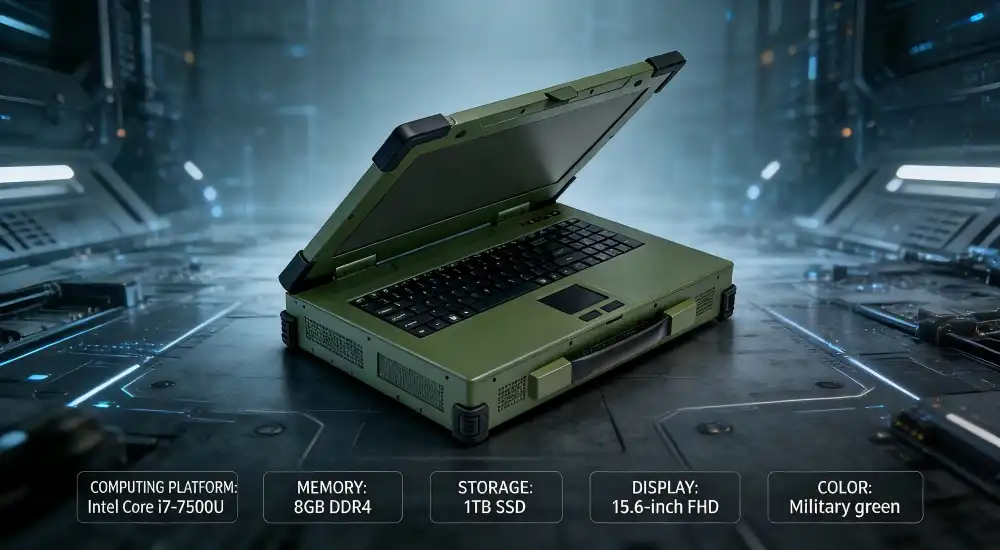
Understanding Rugged Portable Industrial PCs and Touch Operation
As industrial computing has grown, it has given us more advanced gadgets that are both portable and very durable. Rugged portable industrial computers are a special kind of mobile workstations that are made to work reliably in places where regular consumer electronics would break down in hours. It is built with reinforced frames, sealed shelters, and shock-resistant parts so that these systems can handle the harsh conditions that are common in factories, oil rigs, military deployments, and field research.
Core Features of Rugged Industrial Computing Systems
Rugged portable industrial PCs are different from regular industrial PCs because they can keep working even when they are constantly moving, the temperature changes, and they are hit by things. The basic structure is made up of CNC-machined housings made of aluminum or magnesium metal and elastomer shields that protect against drops of up to four feet. Specialized attachment systems protect internal parts by keeping sensitive electronics away from shaking and sudden acceleration forces.
In these settings, touch control technology has to deal with technical problems that consumer devices never have to. Standard sensitive touchscreens depend on electrical conductivity through bare skin contact. This can be a problem when workers wear thick gloves to protect their hands or work in places where electromagnetic interference is present. Because of this, industrial touchscreens use more than one sensing technology at the same time, such as infrared grid recognition systems, resistive pressure sensing, and projected capacitive touch.
Touchscreen Technology Integration Challenges
Adding sensitive touch screens to tough compact computers needs careful thought about how to handle heat, how much power to use, and how to keep out the elements. Touchscreen screens make more heat that needs to be removed without opening up the device's protective case. With the help of dedicated heat pipes and smart airflow management, advanced thermal design keeps the heat from touchscreens away from CPU cooling systems.
Another big problem is sealing against the environment, since tablet parts have places where dust and water could get in. Industrial-grade versions use optical bonding methods to close off any air holes between the LCD panel, touch sensor, and protected glass. This method cuts down on reflection while keeping protection levels at IP65 or higher against water jets and dust getting in.
Comparing Rugged Portable Industrial PCs with and without Touchscreens
To choose between touch-enabled and standard input methods, you need to carefully look at business needs, user tastes, and the total cost of ownership. Depending on the application setting and how the user normally works, each method has its own benefits.
User Experience and Operational Efficiency
Touch-enabled interfaces make it much faster to move around in complicated software programs, especially when workers need to quickly view a lot of data screens. When you directly change visual elements, you don't have to go through the steps you do when you use trackballs or extra keyboards. This lets you respond faster to important tasks. This increase in speed is especially useful when time is of the essence, like when responding to an emergency or doing quality control checks.
But traditional cursor-based interfaces may be better for precise input tasks, like working with detailed CAD models or writing large amounts of text. Touch screens are great for navigating menus, seeing data, and entering simple data, but a keyboard and pointing device still work better for text-heavy programs and exact cursor placement.
Maintenance and Reliability Considerations
Touch-enabled systems add extra complexity that can change how reliable they are over time and how much care they need. Touchscreen systems have more parts that can wear out, like touch controls, flex wires, and protective glass layers. But getting rid of mechanical computers and pointing devices often means fewer moving parts overall, which could make the system more reliable in places with a lot of shaking.
Touch and non-touch systems need very different maintenance methods. Touchscreen settings may need to be changed every so often to keep it accurate, and when cleaning, the way the screen is cleaned must take into account how sensitive the touch sensors are to certain chemicals. On the other hand, standard input devices may get dirt on their mechanical parts over time, which means they need to be cleaned more often and eventually have their worn-out keys or trackball mechanisms replaced.
Applications and Industry Use Cases for Touch-Enabled Rugged Portable Industrial PCs
Rugged portable industrial PCs that can be touched have greatly improved working efficiency in many fields where easy-to-use human-machine interfaces have a direct effect on safety, productivity, and data quality. When you combine the ability to work in harsh environments with quick touch control, you can use computers in ways that weren't possible with older computers.
Manufacturing and Quality Control Operations
Touch-enabled rugged portables are used as mobile quality checking stations that move along with production lines in factories that make cars. Operators use touch screens to get to inspection forms, take pictures of problems, and instantly update production records. The fact that these devices can be used while wearing protective gloves gets rid of the risk of contamination and keeps data accurate during multiple stages of building.
When it comes to tracking parts and keeping records, touch screens are faster and more accurate in aerospace manufacturing settings. Engineers move from one aircraft assembly station to another using portable computers that can be touched to access technical models, check on the progress of assemblies, and communicate with systems in the supply chain. The tough design makes sure that it works well even when it's exposed to metal shavings, hydraulic fluids, and electromagnetic interference from welding.
Mining and Resource Extraction
In underground mines, the harsh conditions put both the durability and touch sensitivity of industrial handheld computers to the test. These gadgets let you check on the state of your equipment, safety system alerts, and production measures in real time. They can also handle dust, water, and vibrations from heavy machinery. When wearing thick protective gloves, touch screens make it easy to quickly acknowledge safety alerts and get to emergency steps.
Ruggedized systems that can be touched are used in surface mining for fleet control and geological mapping. While working in open-pit mines, where temperatures can get very hot and dust is common, operators can use simple touch controls to change 3D geological models, keep equipment repair schedules up to date, and plan shipping operations.
Oil and Gas Field Operations
Offshore drilling platforms use rugged handheld computers that can be touched to keep an eye on safety systems and coordinate operations in salt spray settings where regular electronics break down quickly. The sealed touchscreen parts stay sensitive even when they are exposed to moisture, and the tough design can handle vibrations from drilling and waves.
While traveling through rough terrain, pipeline inspection teams use movable touch-enabled systems to record their results, keep maintenance records up to date, and plan repairs. When GPS and touch-based mapping tools work together, they make it possible to accurately track locations and make good use of resources across large pipeline networks.
How to Choose the Right Rugged Portable Industrial PC with Touch Operation
To choose the best touch-enabled rugged portable industrial PC, you need to carefully consider your needs, the surroundings, and the limitations of the interface. To make sure successful deployment across a wide range of industrial uses, this process must balance short-term functional needs with long-term growth and support concerns.
Environmental Assessment and Operating Conditions
The needed performance and safety grades are directly related to the conditions of the area where the devices will be used. For example, places with a lot of dust need IP65 grades or higher to keep particles out, and places that work with chemicals may need special coats that keep corrosive vapors out. When it comes to temperature changing, both operating ranges and storage conditions need to be taken into account. This is especially true for devices that go from being in climate-controlled rooms to being outside in harsh conditions.
When gadgets will be used on mobile platforms or close to heavy machinery, vibration and shock standards become very important. Basic survivability is guaranteed by MIL-STD-810H compliance, but some uses may need extra validation testing to make sure they are compatible with specific operating stresses. During the decision process, mounting systems and carrying cases that offer extra safety while being moved and stored should be considered.
Connectivity and Integration Requirements
For modern manufacturing processes to work, new technologies, legacy systems, and current infrastructure must all work together without any problems. Rugged portable computers need to have enough ways to connect, like serial ports for older devices, Ethernet ports for integrating them into networks, and wifi choices for remote tasks from afar. Specialized interface cards for private communication methods or measurement devices can be added because expansion slots are available.
System designers really like modular designs because they can fit different hardware setups and are good for the environment. Customized solutions that meet specific practical needs are possible because customer-specific interface boards, transmission modules, and sensor systems can be added without affecting the ruggedness.
Conclusion
Rugged compact industrial PCs with touch screens are an advanced technology that combines toughness in harsh environments with easy-to-use interfaces. In industries like manufacturing, defense, mining, and energy, where standard computer platforms can't keep up with practical needs, these systems fill the gap. When a military-grade building is combined with responsive touchscreens, it opens up new uses and makes existing processes more efficient. Careful consideration of the environment's needs, connectivity requirements, and the supplier's skills guarantees a successful implementation that brings about measurable operating benefits and long-term value in a wide range of industrial settings.
FAQ
1. Can touch-enabled rugged PCs integrate with existing industrial control systems?
Yes, rugged handheld computers with touchscreens usually come with more than one way to connect, such as RS-232/422/485 serial ports, Ethernet ports, and expansion slots for special interface cards. This connection lets PLCs, SCADA systems, and old industrial equipment work together without any problems. It also gives current touch-based user interfaces that make things easier for operators.
2. What maintenance do industrial touchscreens require?
Industrial touchscreens need to be cleaned with approved agents that won't hurt the touch sensors, calibrated every so often to keep them accurate, and their protective coats checked for damage or wear. Most systems have self-diagnostic features that check how well the touch controller is working and let users know about any problems before they affect operation. Preventive upkeep usually includes cleaning every three months and checking the accuracy once a year.
3. How long do rugged portable PCs with touchscreens typically last?
When taken care of properly, good tough handheld industrial computers with touchscreens should work reliably for 5 to 7 years. Because it is made of solid-state components, the touchscreen panel usually lasts longer than other system parts. The rugged casing also saves the internal electronics from damage from the surroundings. Options for longer warranties and the ability to upgrade parts can make an operating life last longer than the original design time.
Partner with MXTD for Your Industrial Computing Solutions
MXTD offers complete rugged handheld industrial PC options that blend cutting-edge touch operation with a history of dependability. We have over 12 years of experience as an engineering team making unique systems that meet the strict needs of semiconductor, aircraft, and industrial automation applications. We know how important it is to have quick technical help, so we keep our promise to answer all customer questions within one hour.
Our skills as a rugged portable industrial PC supplier include both standard products that can be used right away and fully customizable ODM/OEM solutions that are made to fit your exact operating needs. Each system goes through a lot of tests to make sure it works with the technology that's already in place and can be expanded in the future. Get in touch with our expert team at manager03@mxtdinfo.com to talk about your needs for touch-enabled rugged computing and find out how MXTD can improve your business efficiency with reliable, cutting-edge industrial computing solutions.
References
1. "Military Standard 810H: Environmental Engineering Considerations and Laboratory Tests," U.S. Department of Defense Test Method Standard, 2019.
2. "Industrial Computing in Harsh Environments: Design Considerations for Rugged Systems," IEEE Industrial Electronics Society Technical Review, 2023.
3. "Touchscreen Technologies for Industrial Applications: Comparative Analysis of Resistive and Capacitive Systems," Journal of Manufacturing Technology, Vol. 45, 2022.
4. "Environmental Protection Standards for Industrial Electronics: IP Rating Classifications and Applications," International Electrotechnical Commission Standard 60529, 2021.
5. "Thermal Management in Rugged Portable Computing Systems: Best Practices for Touch-Enabled Devices," Industrial Computer Manufacturers Association Guidelines, 2023.
6. "Human-Machine Interface Design for Industrial Control Systems: Touch Technology Integration and Usability Considerations," Automation Engineering Quarterly, Vol. 38, 2022.
Our customers’ satisfaction speaks for our quality — contact us to experience the same reliable service.