- English
- French
- German
- Portuguese
- Spanish
- Russian
- Japanese
- Korean
- Arabic
- Greek
- German
- Turkish
- Italian
- Danish
- Romanian
- Indonesian
- Czech
- Afrikaans
- Swedish
- Polish
- Basque
- Catalan
- Esperanto
- Hindi
- Lao
- Albanian
- Amharic
- Armenian
- Azerbaijani
- Belarusian
- Bengali
- Bosnian
- Bulgarian
- Cebuano
- Chichewa
- Corsican
- Croatian
- Dutch
- Estonian
- Filipino
- Finnish
- Frisian
- Galician
- Georgian
- Gujarati
- Haitian
- Hausa
- Hawaiian
- Hebrew
- Hmong
- Hungarian
- Icelandic
- Igbo
- Javanese
- Kannada
- Kazakh
- Khmer
- Kurdish
- Kyrgyz
- Latin
- Latvian
- Lithuanian
- Luxembou..
- Macedonian
- Malagasy
- Malay
- Malayalam
- Maltese
- Maori
- Marathi
- Mongolian
- Burmese
- Nepali
- Norwegian
- Pashto
- Persian
- Punjabi
- Serbian
- Sesotho
- Sinhala
- Slovak
- Slovenian
- Somali
- Samoan
- Scots Gaelic
- Shona
- Sindhi
- Sundanese
- Swahili
- Tajik
- Tamil
- Telugu
- Thai
- Ukrainian
- Urdu
- Uzbek
- Vietnamese
- Welsh
- Xhosa
- Yiddish
- Yoruba
- Zulu
How to correctly identify the chassis controlled by PXIe-8301 in a commercial computer
Orchestrating Deterministic Signal Fidelity & Hardened Telemetry Architecture: The MXTD Engineering Standard
De-risk your mission-critical deployment timelines and secure your high-stakes operational horizons by collaborating with our international technical applications division at manager03@mxtdinfo.com or manager02@mxtdinfo.com. Connect with our cross-functional engineering desk today to acquire accredited instrumentation blueprints, bespoke OEM hardware synthesis frameworks, or complete physical-layer data-integrity audits.
Strategic Capabilities & Core Offerings
➡️ Accredited Instrumentation Blueprints: Validated hardware schematics engineered for dense multi-channel integration, nanosecond-level edge determinism, and zero-fault operational tolerance.
➡️ Bespoke OEM Hardware Synthesis: Custom physical-layer micro-electronics development and rugged housing design tailored to survive volatile, extreme-shuttle thermodynamic and mechanical environments.
➡️ Physical-Layer Data-Fidelity Audits: Comprehensive telemetry stress-testing and cross-point boundary verification to eliminate signal cross-talk, tracking drift, and data corruption at the absolute source.
The NI PXIe-8301 remote control module utilizes advanced Thunderbolt™ 3 physical-layer transparent bus extension technology, representing the premier architecture for low-cost, small-scale modular instrumentation. However, achieving successful replication of the high-throughput, deterministic PXI Express (PXIe) bus topology within a Commercial Off-The-Shelf (COTS) personal computer routinely faces critical constraints at the software operating system layer. Absent appropriate hardware driver stacks, the COTS PC kernel easily misidentifies the remote chassis hidden behind the Thunderbolt wire as fragmented unknown PCI bridges, inducing full system initialization failures. Engineering guide on how to properly install and configure NI-PXI Platform Services on a commercial computer. The discussion unfolds across critical technical dimensions—including Thunderbolt security clearance coordination, underlying PCIe device-tree enumeration, strict hardware power-on timing alignment, and driver verification protocols—serving as an authoritative technical deployment reference in a bilingual format.
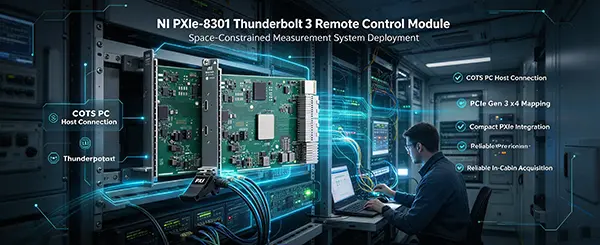
The Operating System's Blind Spot Regarding Remote Instrument Buses
Interfacing the Thunderbolt™ 3/4-based NI PXIe-8301 remote control module to a consumer laptop or desktop workstation presents exceptional physical simplicity, commanding merely a single Type-C-shaped Thunderbolt line. However, at the software layer, standard commercial Windows or Linux operating systems natively lack the kernel code required to parse PXIe backplane geographical metadata, such as chassis slot tracking, backplane reference clocks, or star trigger routing.
Plugging in the cable directly prompts the computer to treat the infrastructure merely as a generic external PCIe expansion dock. Lacking a specialized hardware configuration manager, the OS fail to allocate appropriate low-level Interrupt Requests (IRQs) and Direct Memory Access (DMA) physical memory address channels for the peripheral instrument cards (such as the PXIe-6363 DAQ module) expanding inside the slots. To construct a high-determinism, laboratory-grade instrumentation command hub atop a standard consumer computer kernel, implementing NI-PXI Platform Services driver architecture for deep low-level system virtualization remains a mandatory requirement.
Bus Hard-Mapping Mechanics of Remote Thunderbolt Control
The primary integration benefit of deploying the NI PXIe-8301 Thunderbolt 3 Remote Control Module Board centers on completely decoupling the processing core from the physical carrier frame. Operating over a 40 Gbps high-frequency serial trace, Thunderbolt™ 3 technology effectively extracts and extends the host computer’s local motherboard PCI Express Root Complex over an umbilical wire.
Consequently, within the host operating system layer, the remote PXIe-1088 or PXIe-1071 backplane switches are parsed as an extended PCIe slot integrated straight into the PC's local root complex. Executing this cross-spatial bus synthesis securely requires not merely that the commercial PC's BIOS firmware permits peripheral topology enumeration, but demands the precise configuration of NI specialized platform driver stacks within the OS layer. Any timing synchronization delta or driver gap prompts the motherboard chipset to flag a link-negotiation timeout, refusing to allocate physical memory addresses to the remote instrumentation modules.
Software Deployment: Constructing the Specialized NI Platform Driver Foundation
[Driver Deployment Workflow ] Step 1: Installer Laptop Native Thunderbolt/USB4 Drivers │ ▼ Step 2: Install NI PXI Platform Services (Backplane Topology Recognition Core - Reboot PC) │ ▼ Step 3: Install NI-DAQmx / NI-VISA (specific peripheral card function driver - restart again)
Verifying PC Native Thunderbolt Controller Status
Prior to initiating the deployment of NI software frameworks, confirm that the Windows Device Manager on your commercial computer correctly identifies and drives the "Thunderbolt(TM) Controller" or its corresponding "USB4 Router" entry under System Devices or USB Controllers. Furthermore, it is highly recommended to update the host computer's local Thunderbolt DCH drivers and firmware via the motherboard manufacturer's support site to guarantee optimal 40 Gbps data tunneling execution.
NI PXI Platform Services (Deploying NI PXI Platform Services)
This driver suite represents the absolute operational core enabling a commercial PC to successfully parse the physical PXI Express backplane topology layouts. Users must utilize the NI Package Manager to deploy the latest version of NI PXI Platform Services. This kernel-level software layer incorporates global backplane slot mapping matrix algorithms, PXI clock and trigger routing registry configurations, and specialized PCIe hardware abstraction descriptions. Omitted from the setup, the COTS PC will flag the remote backplane as an unmapped generic PCI bridge even if the Thunderbolt link latches correctly, leaving the NI MAX device tree entirely blank. Upon completion, a mandatory system reboot must be executed to seed the kernel processes.
Hardware Interconnect Topology and Rigid Power-On Initialization Sequence
Within remote control bus architectures, soft-hardware synchronization failures typically stem from violating the rigid timing constraints of the PCIe enumeration window. Engineers must strictly follow this three-step physical deployment protocol:
[ Rigid Physical Power-on Timing Triggering Sequence ] 1. Close the PXIe Chassis Switch (Power On Chassis) ──> 2. Wait 10s for Registers ──> 3. Boot Host PC
Physical Link Anchoring: Securely push the NI PXIe-8301 Thunderbolt 3 Remote Control Module Board into Slot 1 (Dedicated System Controller Slot) of the PXI Express chassis. An officially certified 40 Gbps Thunderbolt 3 cable with a physical screw-locking connector must be used, securing one end to the PXIe-8301 panel and the other end firmly to the physical Thunderbolt port on the commercial PC to prevent impedance surges caused by vibration.
First Sequence: Chassis Power-On First: The physical power switch of the PXIe chassis must be turned on first. At this time, the chassis backplane fan starts running at high speed, and the PCIe switch chip on the backplane and the registers inside the PXIe-8301 control board are powered on and complete self-initialization. Wait 5 to 10 seconds until the Link LED on the PXIe-8301 panel shows a stable amber color or a ready state.
Second Sequence: Commercial Computer Rear-Start: After ensuring the chassis is fully ready, finally press the power button on the external commercial computer to start the system. When the computer's motherboard BIOS performs a Power-On Self-Test (POST) and enters the PCIe device scanning phase, the data stream can smoothly pass through the lightning rods, completely scanning the tree-like nodes of the remote chassis and peripheral cards, and successfully allocating exclusive physical memory mappings for them.
Driver-Layer Approval and Global Verification
Thunderbolt Security Suite Approval: The absolute moment the host PC boots into the Windows desktop, a peripheral connection prompt typically triggers along the taskbar. Open the native "Thunderbolt Command Center" application and locate the remote interface single-slot card entry. Toggle its authorization status to "Always Connect" or "Trust this Device." Absent this programmatic approval, internal Windows kernel security blocks the transmission of active PCIe tunneling packets.
Global NI MAX Device Tree Validation: Launch the Measurement & Automation Explorer (NI MAX) platform. Expand the "Devices and Interfaces" branch; the engine will now automatically re-map and display the comprehensive hardware tree, populating "Chassis 1" alongside the peripheral cards housed across the tracks. Right-click the PXIe-8301 entry and select "Self-Test." A success window indicates the cross-bus configuration is fully complete.
By meticulously deploying the kernel-level NI PXI Platform Services driver pack on an external commercial computer, lifting authorization restrictions within the native Windows Thunderbolt security suite, and rigidly enforcing the "Chassis First, PC Second" physical power-on initialization timing boundary, systems integrators can successfully dissolve the cross-bus barriers dividing COTS computing hosts from industrial PXIe backplanes. This framework grafts commercial computing value into precision instrumentation arrays, constructing a robust and dependable telemetry data nucleus.
Why Choose MXTD Supplier
In extreme operational environments—including supersonic telemetry matrices, continuous destructive lifecycle trials, and experimental sub-kelvin quantum topologies—data drift compromises structural validation and introduces unacceptable systemic liabilities. For more than 12 years, Xi'an Mingxi Taida Information Technology Co., Ltd. (MXTD) has been an indispensable strategic ally, engineering ultra-precise data acquisition (DAQ) systems and hardened embedded edge-computing platforms. Operating as a comprehensive technology vendor, we excel at isolating, capturing, and processing volatile, multi-domain physical phenomena—from high-velocity kinetic impacts to subtle micro-strain shifts—and translating them into uncompromised, real-time digital intelligence.
Founded on strict channel isolation parameters and advanced thermodynamics, MXTD has migrated from a specialized transducer design laboratory into a premier international authority for complex industrial measurement. Our unified corporate framework coordinates internal micro-circuitry R&D, certified high-yield electronic fabrication plants, and a friction-free international distribution network. Across more than a decade of continuous product iteration, our cross-functional engineering cohorts have systematically broken through traditional bottlenecks in multi-channel bandwidth, environmental noise floors, and baseline thermal drift—seamlessly linking harsh physical dynamics with high-level analytical software.
📦 Global Sourcing Resiliency & Decentralized Logistics
Navigating complex electronic component allocation corridors demands an adaptive partner backed by comprehensive, parts-level traceability. MXTD operates a resilient, multi-region logistical fulfillment grid covering North America, Continental Europe, and the Asia-Pacific network. By directly synchronizing our custom OEM/ODM production lines with verified trade pipelines for world-renowned test-and-measurement equipment brands, we completely shield your projects from supply chain choke points. Whether your program requires ready-to-deploy modular chassis or specialized custom-form-factor bare-board sensor nodes, MXTD guarantees immediate engineering turnaround and absolute schedule reliability.
💡 Core Engineering Capabilities & Strategic Offerings
➡️ Authorized Industrial Instrument Allocation: Compliant, direct procurement lines supplying authentic, factory-fresh industrial DAQ modules, rugged backplanes, and low-latency fieldbus transceivers.
➡️ Full-Stack OEM/ODM System Customization: Complete lifecycle electronics development, encompassing dense multi-layer impedance-matched PCB layouts, low-latency firmware virtualization, and ruggedized, IP-rated enclosures.
➡️ Tariff-Optimized Cross-Border Freight: Frictionless customs clearance management and strategic logistics coordination guaranteeing punctual delivery directly to remote testing sites.
➡️ On-Site Technical Application Consultations: Direct peer-to-peer engineering support covering low-level C/C++ hardware abstraction layers, custom LabVIEW virtualization, and field system commissioning.
References
National Instruments. (2026). NI PXI Platform Services Installation and Configuration Guide for Remote Control Topologies. Austin, TX: National Instruments.
Intel Corporation. (2025). Intel Thunderbolt™ 3/4 Security Policies and PCIe Tunneling Layer Architecture Reference. Intel Technical Documentation Core.
FAQs:
Q1: Why is it that even though my software and power-on sequence are completely correct, after the computer is turned on, the Thunderbolt Control Center keeps showing "No device connected" and NI MAX is also blank?
A1: This hardware dead-lock typically traces back to the commercial computer's motherboard BIOS failing to permit PCIe tunneling permissions or leaving Thunderbolt support flags unconfigured. Many commercial hosts (specifically custom desktop motherboards or mini-PCs) ship with remote PCIe tunneling disabled by default to guard against malicious Direct Memory Access (DMA) exploits. The corrective engineering workflow requires:
- Restart the computer, continuously tapping Del or F2 during the initialization splash screen to enter the motherboard BIOS configurations utility;
- Route to "Advanced -> Thunderbolt(TM) Configuration";
- Locate the "Thunderbolt PCIe Support" variable and explicitly modify it to "Enabled";
- Toggle the "Security Level" parameter from its default "User Authorization" setting down to "No Security". Save configuration shifts and cycle host power to clear the physical bus intersection constraints at the hardware layer.
Q2: After the computer successfully identifies the device, it can collect data normally, but it frequently reports data interruption during the data transfer process, indicating "device lost". It can only be restored by re-plugging and unplugging the cable. How can this be reinforced?
A2: This erratic performance failure represents a classic symptom of a complete PCIe Link Dead crash induced by high-frequency impedance mismatches or poor contact friction across low-grade standard USB-C cable leads. Sourced at extreme 40 Gbps rates, a Thunderbolt 3 data pipeline is hyper-sensitive to stray wiring capacitances and tiny physical chattering events. Standard charging lines or non-certified passive cables drift in characteristic impedance when exposed to localized air currents or accidental human touch, prompting the host chipsets to execute a hard logical lock over the link. To resolve this field pain point:
- Immediately substitute generic non-locking tracks with a certified 40 Gbps specialized Thunderbolt 3 wire armed with integrated mechanical Screw-Locking Connectors;
- Mechanically clamp the trace screw directly into the thread patterns of the PXIe-8301 faceplate, ensuring an absolute unyielding electrical reference under in-vehicle or long-term field testing operations.
Q3: My business laptop is running the latest Windows 11 system. It passes the self-test in NI MAX, but the data acquisition channel keeps crashing with random errors, indicating a driver version conflict. How can I solve this?
A3: This software instability typically stems from the Windows 11 automated software updater framework background-preempting and force-overwriting the commercial computer's local native Thunderbolt system drivers, creating an architectural execution gap with legacy NI PXI Platform Services kernels. To resolve this OS-level synchronization conflict, follow these steps:
- Within the Windows 11 control panel administrative properties, completely deactivate the OS automated device-driver updating variables targeting third-party hardware;
- Navigate to the NI platform directory to download and deploy the latest released iteration of NI PXI Platform Services (version 2026 or later) which incorporates system-level optimization specifically for Windows 11 environments;
- Launch the Windows Device Manager, target the Thunderbolt Controller root tree, right-click to select "Update Driver," and force-rollback the interface manually to map to the certified "Standard Intel Industrial DCH Driver" stack, systematically eliminating compatibility layer faults driven by silent OS software pushes.
Our customers’ satisfaction speaks for our quality — contact us to experience the same reliable service.