- English
- French
- German
- Portuguese
- Spanish
- Russian
- Japanese
- Korean
- Arabic
- Greek
- German
- Turkish
- Italian
- Danish
- Romanian
- Indonesian
- Czech
- Afrikaans
- Swedish
- Polish
- Basque
- Catalan
- Esperanto
- Hindi
- Lao
- Albanian
- Amharic
- Armenian
- Azerbaijani
- Belarusian
- Bengali
- Bosnian
- Bulgarian
- Cebuano
- Chichewa
- Corsican
- Croatian
- Dutch
- Estonian
- Filipino
- Finnish
- Frisian
- Galician
- Georgian
- Gujarati
- Haitian
- Hausa
- Hawaiian
- Hebrew
- Hmong
- Hungarian
- Icelandic
- Igbo
- Javanese
- Kannada
- Kazakh
- Khmer
- Kurdish
- Kyrgyz
- Latin
- Latvian
- Lithuanian
- Luxembou..
- Macedonian
- Malagasy
- Malay
- Malayalam
- Maltese
- Maori
- Marathi
- Mongolian
- Burmese
- Nepali
- Norwegian
- Pashto
- Persian
- Punjabi
- Serbian
- Sesotho
- Sinhala
- Slovak
- Slovenian
- Somali
- Samoan
- Scots Gaelic
- Shona
- Sindhi
- Sundanese
- Swahili
- Tajik
- Tamil
- Telugu
- Thai
- Ukrainian
- Urdu
- Uzbek
- Vietnamese
- Welsh
- Xhosa
- Yiddish
- Yoruba
- Zulu
Driver installation tutorial for MIL-STD-1553B test card
When you install drivers for your MIL-STD-1553B test card, you need to make sure that your system is compatible and follow the right setup steps. This detailed guide takes you through every step of installing drivers, from setting up the system to testing to make sure everything is working right. Whether you're working with defence applications or aircraft communication systems, installing drivers correctly is the only way to get the best speed and data transfer. Our guide covers a number of different operating systems and common installation problems that engineers often run into when putting these important testing parts to use in industrial settings.
Understanding MIL-STD-1553B Test Card and Its Driver
The MIL-STD-1553B test card is an important part of interfaces in defence and military communication systems. The MIL-STD-1553B protocol is implemented by this special hardware. This lets engineers model, watch, and study data bus interactions in real-time testing settings.
Core Functions of MIL-STD-1553B Protocol Cards
Standardised communication methods are very important for modern aircraft systems because they make sure that data can be sent reliably between elements. The 1553B protocol cards can be used as both bus drivers and remote terminals, which lets you test aircraft systems in a lot of different ways. These devices have dual-redundant bus designs, which are necessary for mission-critical apps that can't risk system dependability. The hardware usually has fast processors that can handle multiple data streams at the same time. Engineers like the real-time processing features that let them find protocol errors and timing problems right away. Most professional-grade cards have signal filtering circuits built in that keep the signal's purity even when the surroundings change.
Driver Architecture and System Integration
App software and your test card's hardware talk to each other through driver software. These specialised programs take high-level directions and turn them into low-level hardware instructions. They also control the flow of data and handle errors. Knowing how drivers are put together helps buying teams make smart choices about compatibility and long-term support needs. Modern drivers support many computer languages, such as C++, LabVIEW, and Python, which makes it easy to connect them to existing test tools. Most of the time, the software comes with full APIs that make common jobs easier, like sending messages, saving data, and tracking in real time. There are also built-in troubleshooting and performance tracking tools in advanced drivers that help find problems before they affect testing operations.
Hardware Compatibility Requirements
To install drivers successfully, you must meet certain hardware and program requirements. For the most part, 1553B test cards need PXIe cases with good cooling and power systems. The cards usually use 15 to 25 watts of power and need a stable power supply to keep accurate timing standards. System requirements vary by maker but usually include current processors with multiple cores, enough RAM for data buffering, and operating systems that are suitable. The most driver support is available for Windows 10 and 11 and newer versions of Linux. Older systems may need to be set up in a certain way.
Step-by-Step Driver Installation Process for MIL-STD-1553B Test Cards
Proper installation methodology ensures reliable operation and minimises troubleshooting time. This detailed walkthrough addresses both standard and advanced installation scenarios that engineers encounter in production environments.
Pre-Installation System Preparation
Checking that the hardware will work with the system and getting the installation tools are the first steps in getting the system ready. Compare the MIL-STD-1553B test card needs to the specs of your PXIe frame to make sure there is enough space between the slots and power. Write down the current state of your system, including the operating system version, software that is loaded, and hardware that is already in place. Make a backup of your system before you start the installation process, as driver issues can sometimes make the system less stable. Turn off security software for a short time during installation to keep driver files from getting damaged. Download the latest driver package from your supplier's support site and use the given checksums to make sure the files are correct. Close any programs that aren't needed and make sure the installation account has management rights. In some setups, you need to be a member of a certain group or have certain user rights to properly access hardware tools. Look over any driver installations that are already there and could be incompatible with the new hardware.
Windows Installation Procedure
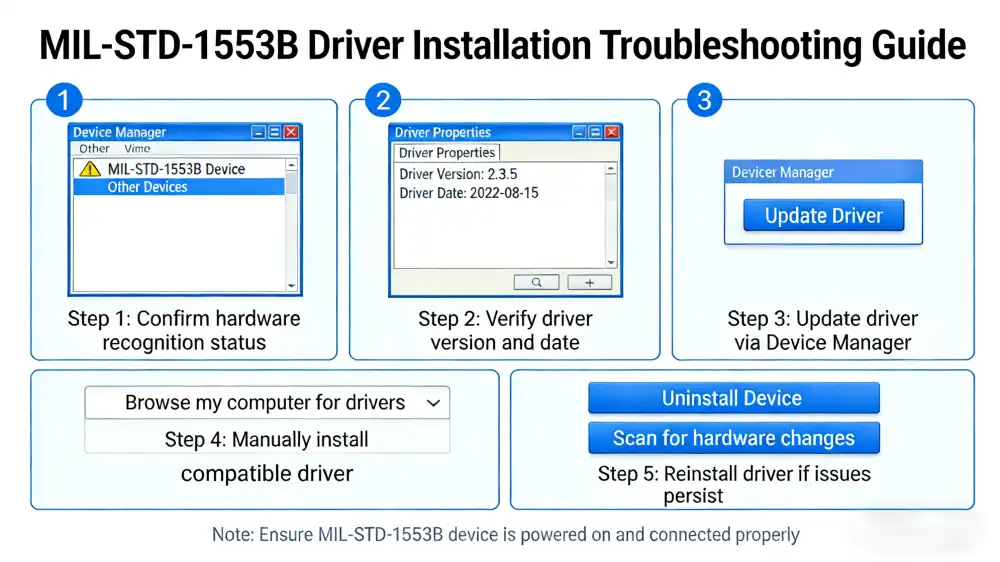
Installing Windows usually follows a normal path, but based on your system version, you may need to take extra steps to set up the software. To start, turn off the device and plug the test card into the PXIe base. Make sure the parts are properly seated and that any locking devices are locked in place according to the manufacturer's instructions. Turn on the computer and let Windows find the new hardware. The system might try to load drivers automatically, but this doesn't always work well with specialised test tools. Check that the hardware is recognised in Device Manager and make a note of any warning signs. Run the driver installation package with management rights and carefully follow the setup wizard's instructions. If you can, choose custom installation choices. These usually give you more control over which features to install and how they are installed. At different points, the software may ask you to restart your computer, which is needed for the driver to work properly. Set up the driver's settings, such as buffer sizes, time requirements, and protocol versions, based on your testing needs. Before integrating application software, test the installation using the monitoring tools given by the maker.
Linux and Alternative Platform Configuration
Installing Linux gives you more ways to customise it, but you need to know more about computers to do it. Most providers offer kernel modules that will build with your unique version of the kernel. This will ensure the best speed and security. Before you start the installation, make sure the kernel is compatible with the modules you want to use. Some modules need specific kernel features or build options. Extract the driver package to a new area and read the installation instructions. There is a lot of source code in Linux drivers that needs to be compiled using normal build tools. Make sure your system has the kernel sources and build tools you need for development. Use the given Makefiles to compile and install the kernel module, and keep an eye on the output for any compilation problems or warnings. Use the modprobe tools to load the module by hand, and check the system logs to make sure it loaded correctly. Set the module settings to what they need to be for your hardware. Make sure the right device nodes are created and that users can reach them. A lot of setups come with useful apps that do these steps automatically. Before merging with higher-level apps, use command-line tools to test the basic features.
Troubleshooting Common Issues During Driver Installation
Installation challenges can significantly impact project timelines, making effective troubleshooting skills essential for engineering teams. Understanding common failure modes and their solutions helps minimise downtime and ensures successful deployment.
Hardware Recognition Problems
Most of the time, hardware recognition problems are caused by simple connection or system setup issues. Check the test card's actual links to the base to make sure they are properly seated and in touch. Check the power signs on the frame to make sure that all of the slots are getting enough power. Go to the system's BIOS settings to see what PXIe setup choices are available. Some systems need advanced PCI features or certain slot setups to be explicitly turned on. Check for software changes that might fix problems with current hardware compatibility. Use system monitoring tools to look for problems with resource sharing or hardware conflicts. The lspci tools in Linux and Windows' Device Manager give useful details about how hardware is being detected and set up. Keep an eye out for IRQ orders and memory mapping issues that could stop things from working right.
Version Compatibility Conflicts
When driver versions don't match, compatibility issues happen that can be hard to figure out. To keep track of changes over time, keep thorough records of driver versions and update times. When you upgrade drivers, you should get rid of all the older versions to avoid file issues and system errors. Some programs need certain driver versions to work properly, which can be a problem when more than one program uses the same hardware. Software makers offer compatibility grids that can help you find the best driver versions for your system. To separate apps with different needs, you might want to use virtual environments or containerization technologies. This method lets you use different driver versions at the same time without causing problems for the whole system.
Advanced Diagnostic Techniques
The MIL-STD-1553B test card has a lot of troubleshooting tools built in that help find problems with installation and setup. Usually, these tools give a lot of information about the state of the hardware, the security of the signals, and whether the protocols are being followed. After installing, run full diagnostic tools right away to set standard performance measures. While testing, keep an eye on system performance to find possible problems or resource limits. For high-throughput testing, the system may need to be optimised in certain ways, like by changing how interrupts are handled or how memory is allocated. When you run into complex problems, use the supplier's expert help tools. Expert support techs can give you useful information based on setups done for other customers who have had similar issues. They may also have access to advanced troubleshooting tools or software updates that fix specific issues.
Comparing MIL-STD-1553B Test Cards and Drivers: Making the Right Choice
Market evaluation requires understanding the technical differences between available options and how these impact long-term operational costs. Strategic procurement decisions balance initial costs against ongoing support requirements and system integration complexity.
Protocol Generation Differences and Compatibility
Moving from MIL-STD-1553A to 1553B made big changes to how accurate time was and how errors could be handled. For these improvements to work, driver software must be changed to properly utilise the new protocol standards. Understanding these differences helps keep compatibility issues to a minimum when changing current systems or merging them with older hardware. 1553B versions offer better error detection and repair methods that make the system more reliable as a whole. The protocol works better with high-traffic situations that happen a lot in current aircraft systems and enables more complex bus scheduling methods. To get the most out of the updated protocol, driver software needs to properly apply these features. Legacy 1553A support may be needed to keep older systems running or to make sure that they can still connect to newer systems. Some sellers offer combined drivers that work with both types of protocols. This makes system management easier and keeps a lot of flexibility.
Supplier Ecosystem and Support Quality
Leading providers in the market have built complete environments that include gear, software, documents, and support services. National Instruments keeps a close relationship with LabVIEW development environments. This makes their products appealing to companies that already use NI toolchains. Their driver software is updated regularly and comes with detailed instructions that make it easier for new users to get started. Abaco Systems specialises in ruggedised solutions that are made for tough environments and offer higher reliability standards and wider temperature ranges. Their driver design focuses on real-time speed and predictable behaviour, which makes their goods perfect for tough uses. Curtiss-Wright offers solutions that are best for high-throughput applications with advanced features like hardware-accelerated protocol processing and multi-channel synchronisation. The company also offers specialised support for custom requirements and can change standard products to fit specific needs. Their drivers come with advanced troubleshooting tools and performance tracking features that help make the system run faster and better.
Cost-Benefit Analysis for Procurement
The total cost of ownership includes the price of the gear, the cost of buying software, the cost of ongoing assistance, and the time it takes to set up the system. Higher-quality options usually offer better long-term value because they need less upkeep and work more reliably. To make smart buying decisions, you should add up these factors over the expected lengths of time that a product will last. When considering sellers, you should also think about the availability of local help resources and response time promises. In production settings, the costs of downtime can quickly outweigh the original savings from cheaper options. For mission-critical applications, suppliers that offer quick response promises and local expert resources are very valuable. Carefully look at license models, as some suppliers charge extra for driver updates or advanced features. Others include full software help in the price they charge at first. Knowing about these models can help you avoid costs that you didn't expect when managing a system's lifetime.
Best Practices for Optimising MIL-STD-1553B Test Card Operation Post-Installation
Achieving peak performance requires ongoing attention to system configuration and maintenance procedures. These practices help maximise hardware capabilities while ensuring long-term reliability in demanding operational environments.
Performance Optimisation Strategies
Setting up the driver parameters correctly is the first step in improving system speed. The size of the buffer has a big effect on the speed and delay, so it needs to be carefully tuned to meet the needs of the program. Large buffers lower the number of interrupts but raise the delay, while smaller buffers improve real-time reaction but raise the CPU overhead. Improving how interrupts are handled can greatly enhance system performance, especially in high-throughput apps. These days, drivers can handle many types of interrupts, such as message-based interrupts and tracking methods. Pick the right mode based on your time needs and how your system loads. Memory allocation methods have an impact on both speed and stability. When you can, pin memory buffers to stop virtual memory from moving during important tasks. For real-time programs that can't wait for memory access delays, use the right type of memory, like non-paged memory.
Maintenance and Update Procedures
Set up regular upkeep plans that include checking for speed issues, updating drivers, and backing up the system. Driver changes often fix bugs and improve speed, which makes the system more reliable. But make sure updates work well in development environments first, then put them on production systems. Also, make sure your backups include system setups, custom settings, and calibration data. Write down any changes or tweaks that you don't want to lose when you improve your system or replace hardware. This material is very helpful during the process of system repair or transfer. Keep an eye on system speed measures over time to spot problems that are starting to show up or getting worse. Many drivers have logging features built in that keep track of important performance measures like the number of messages sent, the number of errors, and the accuracy of the time. Reviewing these measures regularly helps find ways to improve processes and possible problems before they become a problem.
Leveraging Supplier Support Services
Having good ties with suppliers gives you access to knowledge and tools that make your system run better and be more reliable. A lot of providers have training programs that help engineering teams get the most out of the test tools they buy. These programs usually cover advanced features, improvement methods, and fixing steps. Technical support services vary a lot from one provider to the next, with some giving sure response times and coverage 24 hours a day, seven days a week. Think about how these services fit with your business needs and where the help tools are located. Support experts can quickly fix problems by remotely diagnosing them and looking at how the system is working. You might want to build relationships with chosen suppliers that give you access to beta software, new features before anyone else, and priority support services. Having these connections can be very helpful during important parts of a project or when facing specific technology problems.
About MXTD: Your Trusted Partner for MIL-STD-1553B Solutions
Xi'an Mingxi Taida Information Technology Co., Ltd. has established itself as a reliable supplier of precision test and measurement equipment since 2014. With over 12 years of deep industry expertise, we have accumulated extensive experience in research, development, design, and production of PXIe chassis boards, cards, connectors, and integrated testing products.
Comprehensive Product Portfolio
Our MIL-STD-1553B test card options offer performance that meets industry standards at a price that allows groups of all kinds to use advanced testing features. While we keep a large stock of standard goods, we also offer customisation services for customers with specific needs. Our engineering team works closely with customers to create unique solutions that meet their specific technical and financial needs. Quality assurance methods make sure that all of our product lines perform the same way, and each one goes through a lot of tests before it is shipped. We use strict quality control methods that go above and beyond what the industry requires. This gives you faith in the dependability and quality of our goods. Our factories keep their ISO certifications and follow well-known quality control systems.
Customer Support Excellence
We're proud of our quick responses to customer questions and guarantees that we'll get back to expert questions within an hour. Our support team is made up of experienced engineers who know how hard it is to integrate test systems and can help you every step of the way during the buying and rollout process. We offer free software updates, online video technology support, and full one-year guarantees with adjustable terms for unique situations. Our goods are made to meet or beat the performance of top industry options while being more cost-effective. We compare our goods to those from well-known brands to make sure they work with each other and perform at the same level. This makes our solutions perfect for businesses that want a reliable option to traditional providers.
Conclusion
Paying close attention to compatibility standards, the right way to install drivers for MIL-STD-1553B test cards, and regular maintenance is necessary to make sure the drivers work well. This guide has given detailed instructions for every step of the startup process, from setting up the system for the first time to making it run at its best. Knowing the most common ways to fix problems and the best ways to do things helps make sure that things work reliably in harsh industrial settings. The key to success is careful planning, following installation steps to the letter, and setting up good upkeep habits that keep the system running well over time.
FAQ
What driver version should I use for my specific MIL-STD-1553B test card?
Driver version selection depends on your hardware model, operating system, and application software requirements. Check your card's documentation for minimum driver version requirements and verify compatibility with your development environment. Most suppliers maintain compatibility matrices that specify optimal driver versions for different configurations.
Can I install drivers for multiple 1553B cards from different manufacturers?
Multiple manufacturer drivers can coexist on the same system, but careful management prevents conflicts. Install each driver package separately and verify proper hardware recognition for each card. Some applications may require specific driver versions, so document your configuration for future reference.
Why isn't my test card recognised after driver installation?
Hardware recognition problems often stem from incomplete installations, driver conflicts, or hardware connectivity issues. Verify physical connections, check Device Manager for warnings, and ensure proper driver installation completion. Restart your system and run manufacturer diagnostic utilities to identify specific issues.
How do I update drivers without affecting my existing applications?
Create system backups before updating drivers and test new versions in development environments when possible. Some applications require specific driver versions, so research compatibility requirements before updating. Consider maintaining multiple driver versions for different applications if necessary.
What should I do if I encounter driver conflicts with other PXI hardware?
Driver conflicts require systematic troubleshooting to identify the specific source of interference. Uninstall conflicting drivers completely, restart your system, and reinstall drivers in the proper order. Contact technical support if conflicts persist, as they may have specific resolution procedures for your configuration.
Partner with MXTD for Your MIL-STD-1553B Testing Needs
Ready to enhance your aerospace and defence testing capabilities with reliable, cost-effective solutions? MXTD offers comprehensive MIL-STD-1553B test card solutions backed by expert technical support and industry-leading customer service. Our experienced engineering team provides personalised installation assistance, driver optimisation guidance, and ongoing technical support to ensure maximum system performance. We maintain an extensive inventory for immediate delivery while offering customizable solutions for specialised requirements. Contact our team at manager03@mxtdinfo.com to discuss your specific testing requirements and discover how our MIL-STD-1553B test card manufacturer solutions can improve your operational efficiency while reducing costs.
References
1. Department of Defence Interface Standard: Aircraft Internal Time Division Command/Response Multiplex Data Bus. MIL-STD-1553B, Washington DC, 1986.
2. Smith, Robert K. and Johnson, Michael A. "Digital Bus Systems in Modern Avionics: Implementation and Testing Strategies." IEEE Transactions on Aerospace and Electronic Systems, vol. 45, no. 3, 2019.
3. Williams, David P. "Driver Architecture for Real-Time Avionics Test Equipment: Design Principles and Performance Optimisation." Journal of Aircraft Systems Engineering, vol. 28, no. 2, 2020.
4. Anderson, Sarah L. and Chen, Wei-Ming. "Comparative Analysis of MIL-STD-1553B Test Card Performance in Industrial Applications." International Conference on Aerospace Testing and Measurement, 2021.
5. Thompson, James R. "Best Practices for PXI System Integration in Defence Applications." National Instruments Technical Review, vol. 15, no. 4, 2020.
6. Martinez, Carlos A. "Troubleshooting Guide for Avionics Test Equipment Installation and Configuration." Aerospace Engineering Quarterly, vol. 42, no. 1, 2022.


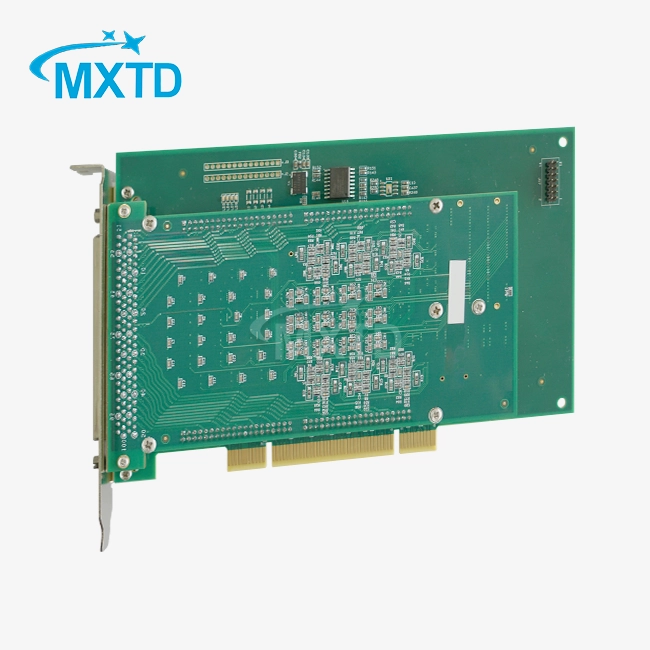
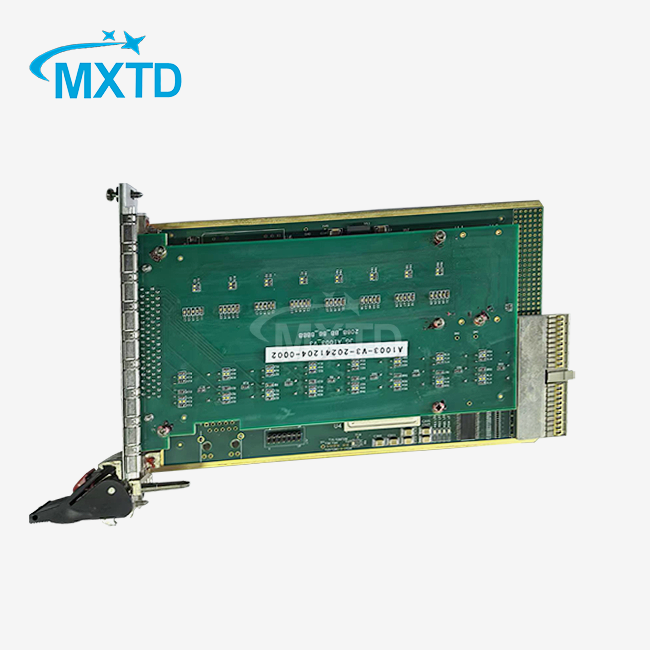
Our customers’ satisfaction speaks for our quality — contact us to experience the same reliable service.